From Inbox to Telegram in Seconds
Email2Chat monitors your inbox 24/7 and delivers every important email straight to Telegram, WhatsApp, or Slack — with AI summary, translation, and reply suggestions included.
The 5-Step Workflow
Connect Your Email
Sign in once using Single Sign-On. No password stored. Takes under 1 minute.
Email Arrives in Your Inbox
Email2Chat watches your inbox 24/7 using real-time push notifications from Google and Microsoft — no polling delay, no missed emails.
Instant Detection
The moment your provider sends a push notification, Email2Chat fetches the full message and queues it for AI processing — typically within 2–5 seconds.
AI Processes the Email
Our AI pipeline runs automatically on every email:
Labels email as Urgent, Important, Promotional, or Spam
Condenses long emails into 1–2 lines so you grasp it instantly
Translates to your language — Arabic, French, Spanish + 200 more
3 smart reply options so you can respond in one tap
Converts the email summary into an audio message — listen while driving or on the go
Notification Delivered
Everything lands in your chat app of choice:
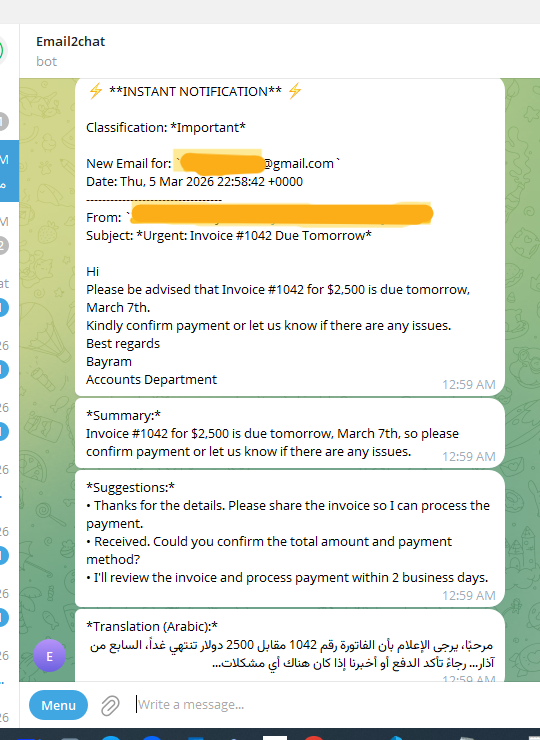
What It Looks Like in Telegram
A real notification — classification, summary, reply suggestions, and Arabic translation all in one message.
Frequently Asked Questions
How fast are notifications delivered?
Typically 2–5 seconds after the email lands in your inbox. We use push notifications from Google and Microsoft — not slow polling.
Do you store my emails?
No. Email content is processed in memory and forwarded to your chat app. We only store metadata (subject, timestamp) for deduplication.
Which email providers are supported?
Gmail, Outlook/Hotmail, Office 365/Microsoft 365, and any IMAP-compatible email (cPanel, Yahoo, custom domains).
Can I filter which emails get forwarded?
Yes. Set filters by sender, subject keywords, or let AI classification handle it — forwarding only Urgent or Important emails.
Is there a free plan?
Yes. Connect one email account and receive notifications for free. Paid plans unlock multiple accounts and advanced AI features.
Ready to Try It?
Connect your inbox in under 1 minute. No credit card required.